 vapora
Guides
Rerank saved observations
- Open a completed run's Ranking tab.
- Set the weights and baseline controls.
- Select Save ranking to regenerate reports and CSVs offline.
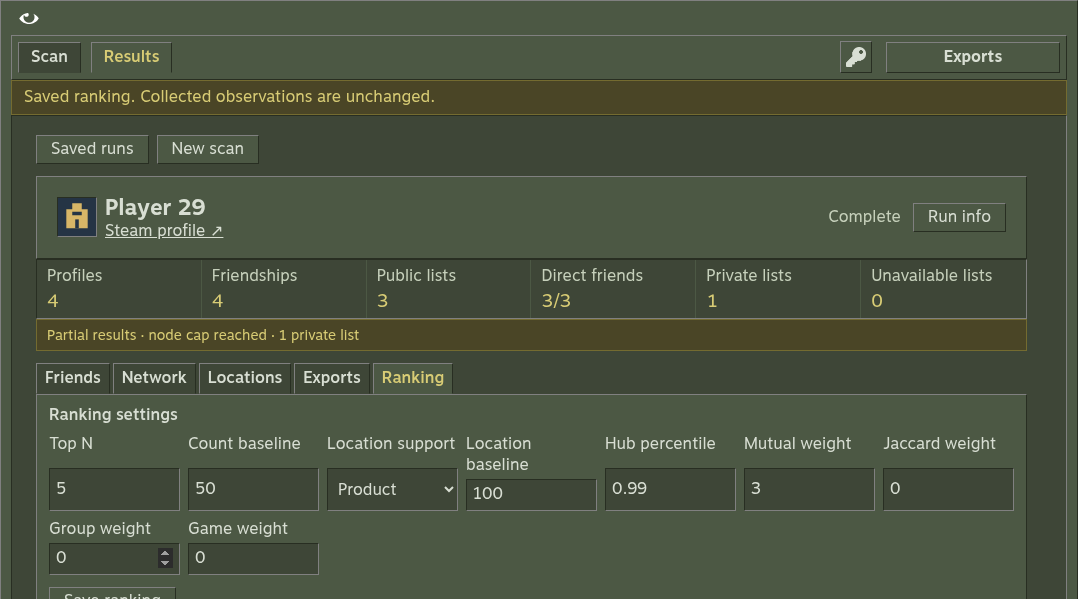
Controls
| Control | Default |
|---|---|
| Incoming-mutual count weight | 1; the only enabled score component |
| Friend, group and game Jaccard weights | 0 |
| Top N | 5 |
| Count baseline | 50 |
| Location aggregation | Product |
| Location baseline | 100 |
- Reranking uses saved observations and needs no API key or provider calls.
- Missing games, groups or friendships remain missing, with availability visible.
- All-zero weights produce no combined index and sort observed incoming counts.
- Attached history indices are recalculated; collection settings and observations stay intact.
- Incomplete runs and concurrent Steam/analysis operations reject reranking.
Recover exports
Use Exports → Rebuild exports on a completed run when you need to regenerate files from current saved observations. It preserves checkpoint bytes and attached history.
npm start -- analyze RUN_ID --root ./researchThe CLI rebuilds reports; it does not provide a command to change a saved run's ranking weights. Use Save ranking in the UI for that.
Read scoring reference for formulas and settings for allowed values.