 vapora
History captures
Load and refresh automatically
- Verify a target or select a recent avatar. Vapora loads that account's history separately from the Steam scan.
- Loading runs in the background without opening a browser window. A blocked request keeps the last capture and offers Retry.
- Use History, below Save settings and Load settings, to open the viewer. Use Refresh to fetch again; saved captures are reused until then.
Typing a target does not make requests. A history failure does not block Steam scanning.
| Result | What Vapora keeps |
|---|---|
| Complete fetch | All history sections and paginated responses, with source URLs |
| Partial fetch | Returned records plus the failed section or count discrepancy |
| Blocked or failed refresh | The last dated capture, with a Retry option |
Matching captures attach to run results. Historical facts stay separate from current Steam observations; source dates stay separate from retrieval time.
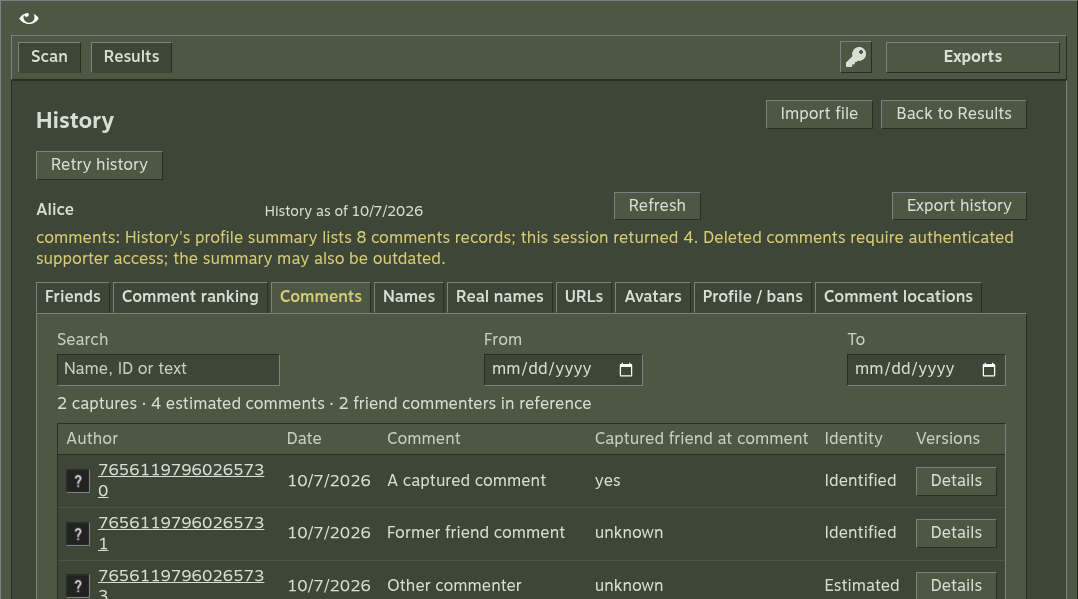
Why comment totals can differ
Automatic loading uses a fresh public session and requests every comment page, including deleted-comment pages.
- Some deleted comments require an authenticated supporter session.
- The profile-summary counter may be stale or include inaccessible records.
- Vapora records the summary total and accessible endpoint total separately. A gap marks coverage partial; missing comments are not invented.
- Imported authenticated captures retain the records supplied by the user.
Inspect the viewer
| Section | Contents |
|---|---|
| Friends | Friendship periods and membership evidence |
| Profile | Previous names, URLs and avatars |
| Comments | Captured messages and a separate comment ranking |
| Profile and bans | Dated profile metadata and ban observations |
Use search, friendship filters and date ranges to narrow the view. Profile and ban date filters use the source observation date.
The friend-comment index uses positive-count authors with friendship evidence anywhere in the captures, including former friends. Changing the friendship filter does not change that reference population.
Import a local capture
Use Import history, or:
npm start -- history FILEAccepted inputs: normalized JSON, profile NDJSON and complete provider Svelte data/chunk streams. Browser imports accept up to 2 MB.
{
  "steamID64": "76561198000000000",
  "name": "Example",
  "lastChecked": 1750000000,
  "historic": {
    "friends": [
      { "Friend": "76561198000000001", "FriendDate": 1700000000, "UnfriendDate": 0, "Name": "Friend" }
    ],
    "persona": [],
    "url": [],
    "pfp": [],
    "comments": []
  }
}
Every capture, unknown field and original input stays in the export. Original downloads the input unchanged. Automatic captures preserve raw profile/page responses and can be reimported.
Interpret dates
| Field or condition | Meaning |
|---|---|
| Dates | Unix seconds |
Zero or missing UnfriendDate | Friends as of the source date, not necessarily today |
lastChecked or lastUpdated | Provider observation date |
| Newer closure | Supersedes an older open record |
| Overlapping intervals | Count once |
| Invalid or contradictory periods | Remain inspectable, with unknown duration |
Attach to a saved run
Attach history only to a run for the same Steam account. It reopens with that run and adds history.json to exports. You can also import history independently.
Related references
History formats and date rules · Scoring · Privacy and coverage