# How Vapora works (/docs/explanation/architecture)
1. Resolve the target and collect profiles through the Steam Web API.
2. Walk friendships breadth first, saving checkpoints after completed scan units.
3. Build an undirected friendship graph with separate optional group edges.
4. Compute communities, centrality, friend rankings and location signals.
5. Save reports and exports in a unique run folder.
Vapora uses public API observations and local history files. Account history is fetched separately after account verification or selection; blocked requests remain visible and do not stop Steam scans. Missing observations and truncated graphs remain visible in the report.
## Shared engine [#shared-engine]
| Layer | Main source |
| ------------------------------------------------ | --------------------------------------------------------------------- |
| CLI argument parsing and dispatch | `src/cli.ts` |
| Target parsing | `src/ids.ts` |
| Steam observations, pacing and retries | `src/steam.ts` |
| Breadth-first collection and checkpoint frontier | `src/scanner.ts` |
| Graph construction, ranking and exports | `src/analysis.ts`, `src/scoring.ts` |
| Validated local persistence | `src/storage.ts`, `src/model.ts` |
| Loopback HTTP server | `src/server.ts` |
| History collection and normalization | `src/history-browser.ts`, `src/history-provider.ts`, `src/history.ts` |
| Browser renderer | `ui/` |
| Electron host and fixed preload bridge | `scripts/desktop.mjs`, `scripts/desktop-preload.cjs` |
The TypeScript + Effect application shares collection, analysis and storage across all three launch modes. The desktop renderer is isolated from Node and uses a fixed IPC surface. The history collector uses an independent temporary Chromium session; it does not receive the Steam API key or renderer bridge.
## Why saved observations matter [#why-saved-observations-matter]
A checkpoint stores settings, profiles and the pending frontier. Analysis and CSV files are derived from that local record. This enables resume, offline reranking and export rebuilding, while retaining coverage and observation dates. A history refresh is separate from a Steam scan and never blocks it.
# Privacy, coverage and limits (/docs/explanation/privacy)
## Public access only [#public-access-only]
Vapora uses the Steam Web API and public observations. It does not bypass profile privacy. Profile visibility and friend-list visibility differ; a private friend list is not an empty public list. Unknown visibility is not proof of privacy.
| Display state | Meaning |
| ------------- | ------------------------------------------------------ |
| Off | Optional collection disabled |
| Private | Privacy prevents observation |
| Skipped | Collection skipped by the selected policy |
| Not scanned | Observation has not been collected |
| Unavailable | A request or provider could not supply the observation |
| Not provided | A public location field was absent |
## Collection boundaries [#collection-boundaries]
The node cap includes the target. Depth bounds expansion. Ranking may use known direct friends outside the admitted graph, while metrics use only admitted accounts. Truncated graphs and failed observations remain visible. Estimates at depths 3–5 cover the first two levels only.
## Heuristics [#heuristics]
Communities and centrality describe the captured graph. Ranking indices measure supplied support, not the probability of friendship. Steam country/state/city fields are self-reported codes, not verified residence. Network and captured friend-comment location evidence remain separate.
## Dated sources [#dated-sources]
Account history is an independent source. Its observation time differs from retrieval time and current Steam facts. Partial histories cannot prove absence. Provider comment totals can be stale or include records inaccessible to a fresh public session.
## Local credentials and data [#local-credentials-and-data]
The browser server binds to loopback, validates Host and mutation origins, and restricts downloads to known run artifacts. Desktop keys can use OS-backed encryption; browser keys are session-only. Keys never appear in reports. Saved runs and history can contain profile observations and comments: inspect their contents before sharing.
## Project scope [#project-scope]
Vapora is independent and unofficial, with no affiliation or endorsement from Valve or Steam. The original Python implementation and old local formats are separate from the current app. There is no automatic migration.
# Steam API key (/docs/getting-started/api-key)
Get a key from [Steam's API key page](https://steamcommunity.com/dev/apikey). Follow Steam's requirements; Vapora does not issue keys.
## Desktop or browser [#desktop-or-browser]
1. Open **Set API key** in the toolbar.
2. Paste the key. On desktop, select **Remember API key** if you want secure storage.
3. Save. Vapora checks the key with Steam, clears the input and continues the operation that requested it.
A submitted key replaces the session key only after validation succeeds.
| Choice | Where the key lives |
| ------------------------- | ------------------------------------------------------- |
| Browser | Current session only |
| Desktop, without Remember | Current session; any remembered copy is removed |
| Desktop, with Remember | OS-encrypted `steam-key.enc` in the desktop data folder |
| Forget saved key | Deletes the stored file; current session remains usable |
**Remember API key** is available only with secure OS encryption. Linux's insecure `basic_text` backend disables it.
Remembered keys belong to the OS account and machine that encrypted them. Enter the key again after moving a portable install to another machine.
## CLI [#cli]
Set `STEAM_API_KEY` in your shell:
```sh title="Bash / Zsh"
export STEAM_API_KEY='YOUR_KEY'
npm start -- estimate 'https://steamcommunity.com/id/example' --depth 1
```
```powershell title="PowerShell"
$env:STEAM_API_KEY = 'YOUR_KEY'
npm start -- estimate 'https://steamcommunity.com/id/example' --depth 1
```
Or copy `.env.example` to `.env` and fill in the key. `npm start` loads that file when present. An environment key takes precedence at desktop startup.
Keep `.env` private. Keys stay on the local server and never appear in reports or exports.
## Operations without a key [#operations-without-a-key]
* Browse saved runs.
* Rerank observations or rebuild exports offline.
* Manage settings profiles.
* Import local history.
See [CLI reference](/docs/reference/cli) for command requirements.
# Your first scan (/docs/getting-started/first-scan)
## Before you begin [#before-you-begin]
[Install Vapora](/docs/getting-started/installation) and [set an API key](/docs/getting-started/api-key). Choose a Steam account whose public network you want to inspect.
## 1. Verify the target [#1-verify-the-target]
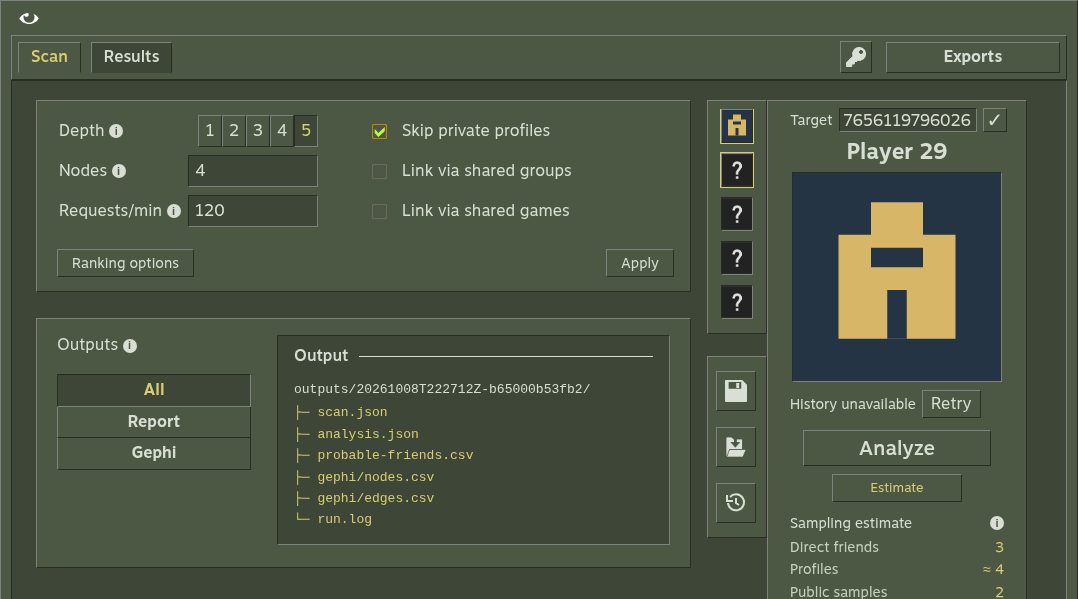
In **Scan**, enter a profile URL or SteamID64. Use the check button to fetch its name and avatar without starting a scan. Typing alone makes no Steam requests. A verified account can load account history independently; history failures do not block the scan.
| Input | Example |
| ------------- | ------------------------------------------------------- |
| Vanity URL | `https://steamcommunity.com/id/example` |
| SteamID64 URL | `https://steamcommunity.com/profiles/76561198000000000` |
| SteamID64 | `76561198000000000` |
These are illustrative identifiers; replace them with your target. For numeric vanity names, use `/id/NAME` explicitly.
## 2. Bound the scan [#2-bound-the-scan]
Use depth **1**, node cap **100** and requests/min **120** for this first run. Leave groups and games off. Depth 1 admits the target and direct friends. The cap includes the target.
Select **Estimate**. It samples at most five friend lists and respects the cap; it is not a promise of final coverage.
## 3. Analyze [#3-analyze]
Select **Analyze** and watch the progress. Vapora saves checkpoints after completed scan units. If you cancel, reopen the saved run and resume it later.
## 4. Read the result [#4-read-the-result]
Open **Results**. Inspect the friend ranking and coverage, then open **Network**, choose **Maximize view** and select a node. Notice the distinction between admitted profiles, ranking candidates and unavailable observations.
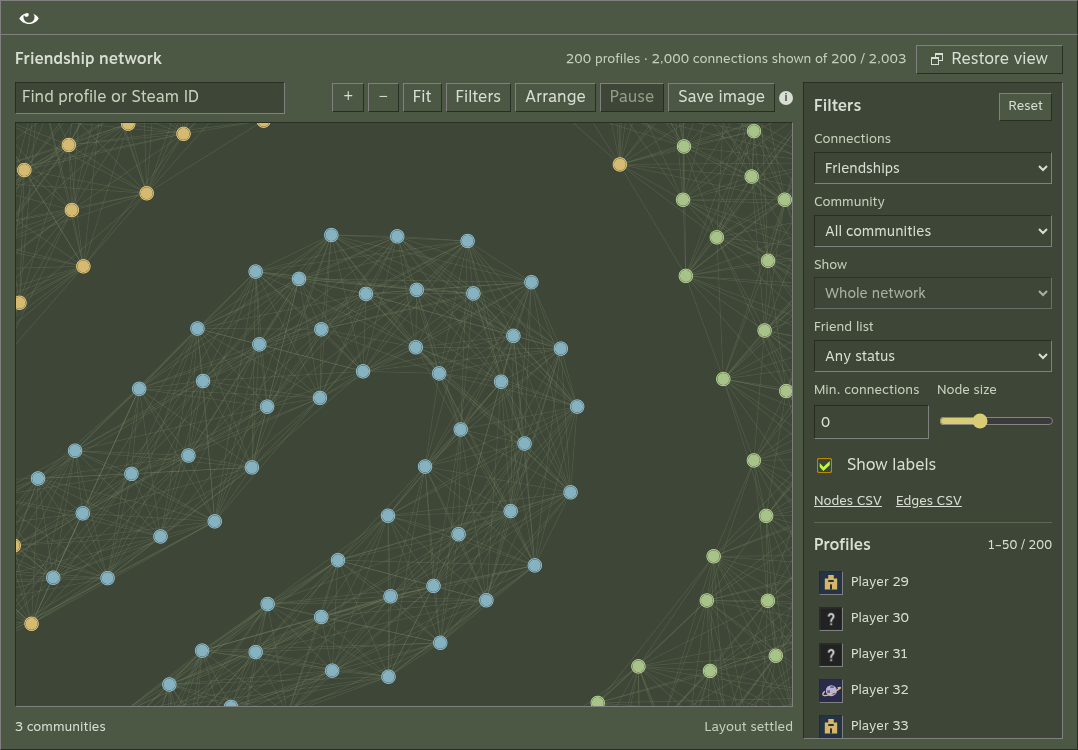
A small or private network may have few usable links. This describes collection coverage, not an absence of friendships.
## 5. Keep the output [#5-keep-the-output]
Open **Exports**. Desktop can open the output folder; browser mode provides downloads. A completed run contains `scan.json`, `analysis.json`, `probable-friends.csv`, `run.log` and Gephi CSVs. Attached history adds `history.json`.
You now have a saved run you can reopen, rerank and export without collecting again. Continue with [network exploration](/docs/guides/network), [scoring](/docs/reference/scoring) or [Gephi](/docs/guides/gephi).
# Installation (/docs/getting-started/installation)
## Desktop [#desktop]
Download the matching asset from the [latest release](https://github.com/Microck/vapora/releases/latest). Desktop packages need no Node.js, Python or separately installed browser.
| Platform | Asset | Launch |
| ------------------- | ------------- | -------------------------------------------------------- |
| Windows x64 | Installer EXE | Run the installer, then open Vapora |
| Windows x64 | Portable EXE | Run from a writable folder; keep `Vapora-data` beside it |
| Linux x64 | AppImage | Make executable, then launch in a graphical desktop |
| macOS Apple Silicon | DMG | Drag Vapora into Applications |
Downloads are unsigned and not notarized. Compare the downloaded file's SHA-256 with the release's `SHA256SUMS.txt` before approving an OS warning.
```powershell title="PowerShell"
Get-FileHash .\vapora-2.2.3-win-x64.exe -Algorithm SHA256
```
```sh title="Terminal"
sha256sum vapora-2.2.3-linux-x86_64.AppImage
chmod +x vapora-2.2.3-linux-x86_64.AppImage
./vapora-2.2.3-linux-x86_64.AppImage
# Without FUSE
./vapora-2.2.3-linux-x86_64.AppImage --appimage-extract-and-run
```
```sh title="Terminal"
shasum -a 256 vapora-2.2.3-mac-arm64.dmg
```
Asset names above describe 2.2.3; use the filenames from your selected release.
## Browser and CLI from source [#browser-and-cli-from-source]
Install Node.js 24+ and Python 3.10+ for the one-time history runtime build.
```sh
git clone https://github.com/Microck/vapora.git
cd vapora
npm ci
npm run build
npm run build:history
```
```sh
npm start -- serve
```
Open the printed loopback address, normally `http://127.0.0.1:3000`. Run `npm run desktop` for an Electron window from the same checkout. Run `npm start -- --help` for the CLI.
`npm ci` downloads Electron. `npm run build:history` builds the frozen Pydoll helper and downloads its pinned Chromium. Linux requires a graphical desktop and GTK/NSS libraries. Windows source installs need the matching Microsoft Visual C++ runtime: [x64](https://aka.ms/vs/17/release/vc_redist.x64.exe) or [ARM64](https://aka.ms/vs/17/release/vc_redist.arm64.exe).
## Next [#next]
[Set up your API key](/docs/getting-started/api-key), then [make a first scan](/docs/getting-started/first-scan). See [saved runs](/docs/guides/saved-runs) for data locations and portable moves.
# Export to Gephi (/docs/guides/gephi)
## Before you start [#before-you-start]
Complete a scan and open its output folder or download its Gephi exports. Keep `nodes.csv` and `edges.csv` from the same run together.
1. Create a project and import `gephi/nodes.csv` as a nodes table.
2. Import `gephi/edges.csv` as undirected edges.
3. Filter `Kind` to `friend` for friendship analysis; include `group` for shared membership.
4. Run ForceAtlas2, color by `modularity_class`, and size by `betweenness` or `degree`.
Start with friendship edges, then inspect shared-group links separately. Degree filters and k-core analysis can help explore dense groups. Communities and centrality describe the collected graph, which may cover only part of a person's network.
## Preserve the meaning of each edge [#preserve-the-meaning-of-each-edge]
`Kind=friend` describes an observed friendship; `Kind=group` describes shared membership. Mixing these creates a different graph. Steam IDs should stay exact text identifiers.
## Reproduce your analysis [#reproduce-your-analysis]
Keep the original `scan.json`, `analysis.json` and collection settings beside your Gephi project. Record filters and layout choices when sharing a visualization. A truncated or partially observed network remains partial after importing it.
See [exports reference](/docs/reference/exports) for the exact columns and [network metrics](/docs/guides/network) for their interpretation.
# History captures (/docs/guides/history)
## Load and refresh automatically [#load-and-refresh-automatically]
1. Verify a target or select a recent avatar. Vapora loads that account's history separately from the Steam scan.
2. Loading runs in the background without opening a browser window. A blocked request keeps the last capture and offers Retry.
3. Use **History**, below **Save settings** and **Load settings**, to open the viewer. Use **Refresh** to fetch again; saved captures are reused until then.
Typing a target does not make requests. A history failure does not block Steam scanning.
| Result | What Vapora keeps |
| ------------------------- | -------------------------------------------------------------- |
| Complete fetch | All history sections and paginated responses, with source URLs |
| Partial fetch | Returned records plus the failed section or count discrepancy |
| Blocked or failed refresh | The last dated capture, with a Retry option |
Matching captures attach to run results. Historical facts stay separate from current Steam observations; source dates stay separate from retrieval time.
### Why comment totals can differ [#why-comment-totals-can-differ]
Automatic loading uses a fresh public session and requests every comment page, including deleted-comment pages.
* Some deleted comments require an authenticated supporter session.
* The profile-summary counter may be stale or include inaccessible records.
* Vapora records the summary total and accessible endpoint total separately. A gap marks coverage partial; missing comments are not invented.
* Imported authenticated captures retain the records supplied by the user.
## Inspect the viewer [#inspect-the-viewer]
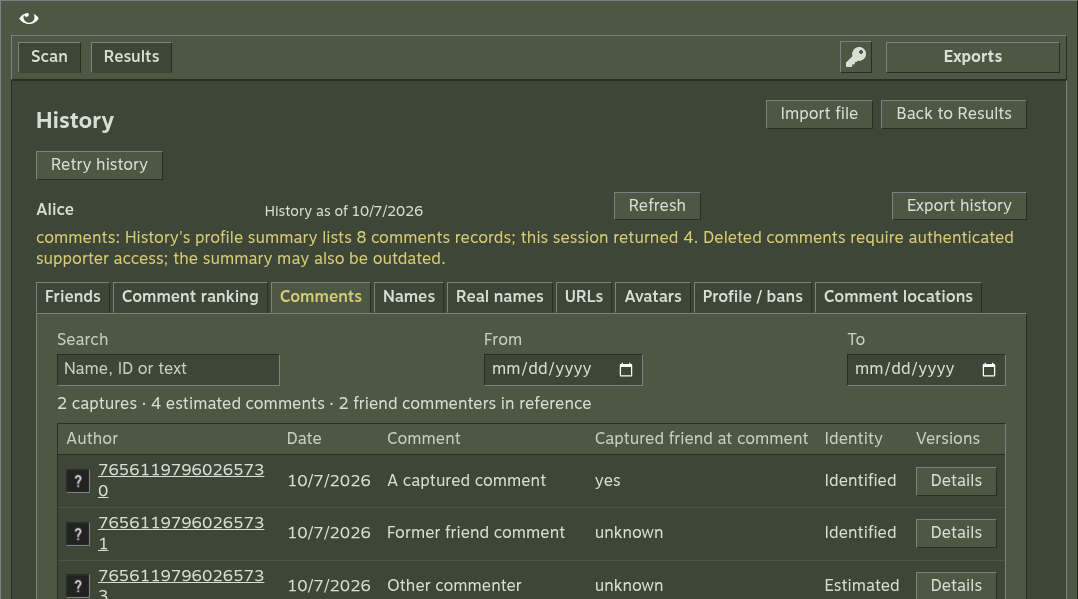
| Section | Contents |
| ---------------- | ------------------------------------------------ |
| Friends | Friendship periods and membership evidence |
| Profile | Previous names, URLs and avatars |
| Comments | Captured messages and a separate comment ranking |
| Profile and bans | Dated profile metadata and ban observations |
Use search, friendship filters and date ranges to narrow the view. Profile and ban date filters use the source observation date.
The friend-comment index uses positive-count authors with friendship evidence anywhere in the captures, including former friends. Changing the friendship filter does not change that reference population.
## Import a local capture [#import-a-local-capture]
Use **Import history**, or:
```sh
npm start -- history FILE
```
Accepted inputs: normalized JSON, profile NDJSON and complete provider Svelte data/chunk streams. Browser imports accept up to **2 MB**.
```json
{
"steamID64": "76561198000000000",
"name": "Example",
"lastChecked": 1750000000,
"historic": {
"friends": [
{ "Friend": "76561198000000001", "FriendDate": 1700000000, "UnfriendDate": 0, "Name": "Friend" }
],
"persona": [],
"url": [],
"pfp": [],
"comments": []
}
}
```
Every capture, unknown field and original input stays in the export. **Original** downloads the input unchanged. Automatic captures preserve raw profile/page responses and can be reimported.
## Interpret dates [#interpret-dates]
| Field or condition | Meaning |
| -------------------------------- | ---------------------------------------------------- |
| Dates | Unix seconds |
| Zero or missing `UnfriendDate` | Friends as of the source date, not necessarily today |
| `lastChecked` or `lastUpdated` | Provider observation date |
| Newer closure | Supersedes an older open record |
| Overlapping intervals | Count once |
| Invalid or contradictory periods | Remain inspectable, with unknown duration |
## Attach to a saved run [#attach-to-a-saved-run]
Attach history only to a run for the same Steam account. It reopens with that run and adds `history.json` to exports. You can also import history independently.
## Related references [#related-references]
[History formats and date rules](/docs/reference/history-format) · [Scoring](/docs/reference/scoring) · [Privacy and coverage](/docs/explanation/privacy)
# Explore the network (/docs/guides/network)
Open a saved run in **Results**, then select **Network** for a compact preview. Choose **Maximize view** to explore inside Vapora. **Restore view** returns to the preview without losing filters, selection or zoom. The graph is built only when opened.

## Find and inspect an account [#find-and-inspect-an-account]
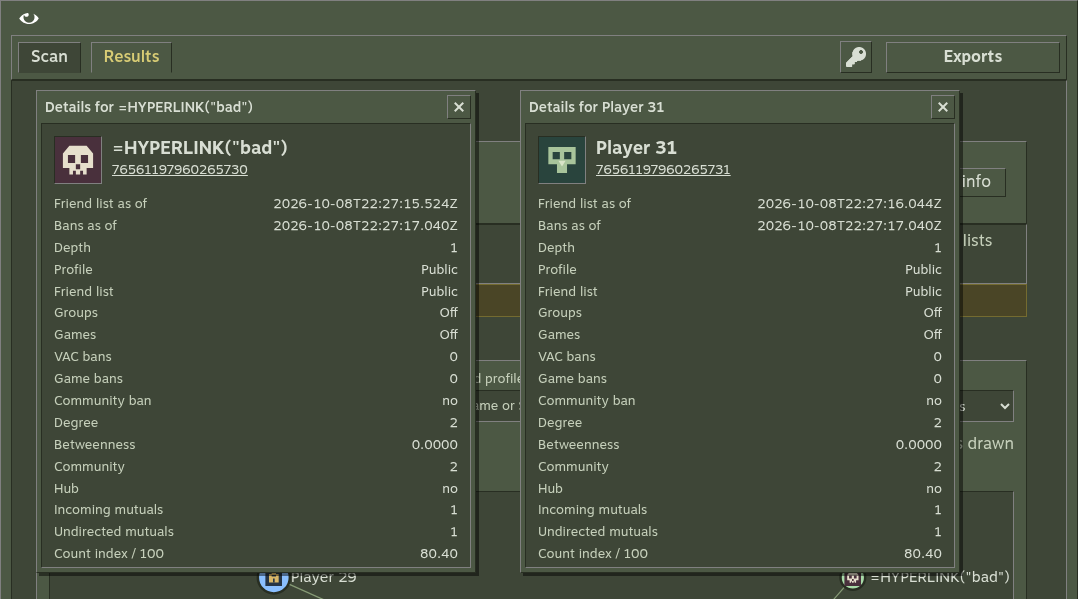
Search by name or Steam ID. Select an entry in the **Profiles** list or a graph node, then choose **Details**. Each node uses its saved profile picture; missing pictures use the local placeholder. The inspector shows its Steam link, avatar, collection depth, visibility, ban observations, signal availability, degree, betweenness, community and hub status. Missing ban data is different from confirmed ban records.
## Read the graph [#read-the-graph]
| Metric | Meaning in the collected friendship graph |
| ----------- | ---------------------------------------------------------- |
| Degree | Number of connected friendship edges |
| Betweenness | Normalized shortest-path centrality |
| Community | Louvain grouping of admitted friendship links |
| Hub | Positive betweenness at or above the configured percentile |
Community colors describe detected clusters; they do not identify real-world groups. When betweenness is zero across the graph, there are no hubs. Optional group links are separate from friendship metrics.
## Explore and export [#explore-and-export]
| Control | Action |
| ----------------------- | --------------------------------------------------------------------------------------- |
| Connections | Show friendships, shared-group links or both |
| Community / Friend list | Limit the view by cluster or collection status |
| Show | Inspect the selected account's direct neighbours or two hops |
| Min. connections | Keep profiles with at least this many links of the selected type in the collected graph |
| Node size / Show labels | Adjust how profiles appear |
| Pause / Resume | Stop or resume the automatic layout |
| Save image | Download the current view as a PNG with a 4,096-pixel long edge |
| Nodes CSV / Edges CSV | Download graph data for [Gephi](/docs/guides/gephi) |
Search highlights matches without hiding other profiles. Selection highlights its connections; the footer counts links visible under the current filters. Group links stay separate from friendship centrality.
Drag a node to pin its position. Choose **Unpin** to let it move during the next arrangement. Drag empty space to pan, use the wheel or **+ / −** to zoom, and choose **Fit** to reset the camera. The **Profiles** list supports keyboard selection; with the graph focused, use arrow keys to pan and **Enter** for Details.
Layout starts automatically when Network opens and stops when settled. It pauses while Network is hidden and resumes when you return if it was still running. A manual pause stays paused. Large or dense graphs can still render slowly; hide labels, use filters or pause layout. Pictures load only when their circles are large enough to read. Exploration uses saved observations and makes no new Steam API requests.
## Compare coverage first [#compare-coverage-first]
Graph metrics use admitted accounts and observed friendship edges. Ranking can include direct friends outside the admitted graph. A node cap or unavailable list changes the measured graph; compare runs only with that context. See [privacy and coverage](/docs/explanation/privacy).
## Compare details [#compare-details]
Each **Details** button opens an independent window. Keep several open to compare profiles or records. Drag a title bar, or focus it and use the arrow keys, to move the window. **Escape** closes the focused window.
# Rerank saved observations (/docs/guides/ranking)
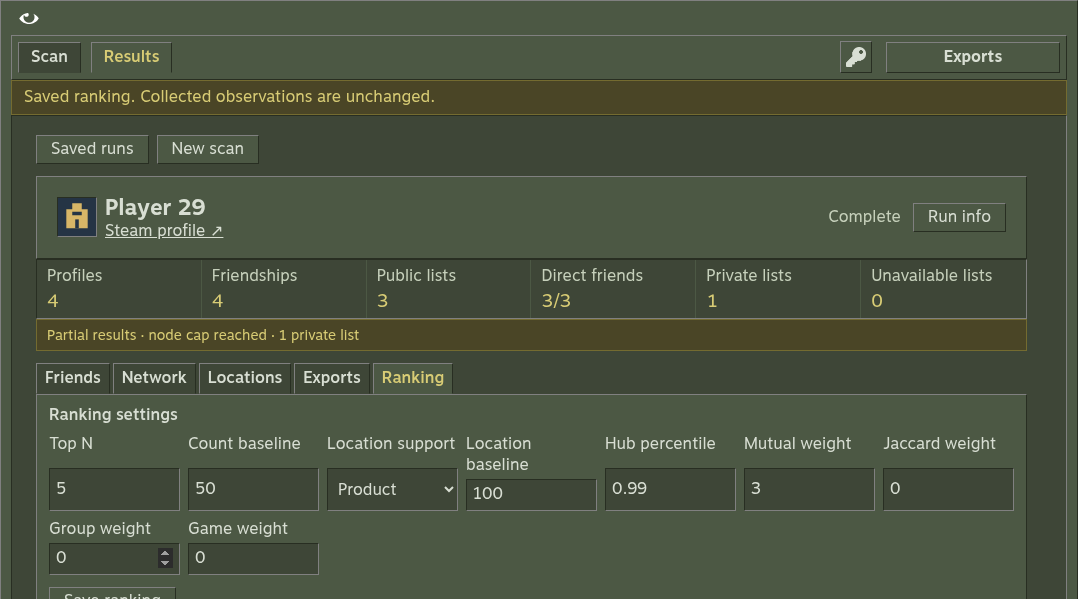
1. Open a completed run's **Ranking** tab.
2. Set the weights and baseline controls.
3. Select **Save ranking** to regenerate reports and CSVs offline.
## Controls [#controls]
| Control | Default |
| -------------------------------------- | ----------------------------------- |
| Incoming-mutual count weight | 1; the only enabled score component |
| Friend, group and game Jaccard weights | 0 |
| Top N | 5 |
| Count baseline | 50 |
| Location aggregation | Product |
| Location baseline | 100 |
* Reranking uses saved observations and needs no API key or provider calls.
* Missing games, groups or friendships remain missing, with availability visible.
* All-zero weights produce no combined index and sort observed incoming counts.
* Attached history indices are recalculated; collection settings and observations stay intact.
* Incomplete runs and concurrent Steam/analysis operations reject reranking.
## Recover exports [#recover-exports]
Use **Exports → Rebuild exports** on a completed run when you need to regenerate files from current saved observations. It preserves checkpoint bytes and attached history.
```sh
npm start -- analyze RUN_ID --root ./research
```
The CLI rebuilds reports; it does not provide a command to change a saved run's ranking weights. Use **Save ranking** in the UI for that.
Read [scoring reference](/docs/reference/scoring) for formulas and [settings](/docs/reference/settings) for allowed values.
# Saved runs and local data (/docs/guides/saved-runs)
## Data roots [#data-roots]
| Launch mode | Default root | Override |
| ----------------- | ------------------------------------ | ------------------ |
| Browser / CLI | Current working directory | `--root DIRECTORY` |
| Installed desktop | OS app-data directory under `Vapora` | `VAPORA_ROOT` |
| Windows portable | `Vapora-data` beside the EXE | `VAPORA_ROOT` |
Use the same root to share runs between launches, with one process operating on a saved run at a time.
| Path under the root | Contents |
| ------------------------------- | ------------------------------------------------------------------------- |
| `outputs//` | Scan checkpoint, analysis, CSV exports, log and optional attached history |
| `profiles/.json` | Named settings profiles |
| `history/.json` | Cached account history captures |
| `steam-key.enc` in desktop data | Optional OS-encrypted remembered key |
## Reopen a run [#reopen-a-run]
Use the **Results** run list. The recent-avatar rail only preselects a scan target; it does not open a saved report or change settings. Selecting an account can load its history independently.
```sh
npm start -- recent --root ./research
npm start -- resume RUN_ID --root ./research
```
## Back up or move [#back-up-or-move]
Close Vapora before copying the data root to preserve a consistent set of files. For Windows portable, move the EXE and `Vapora-data` together. A remembered key is bound to its original OS account and machine; enter it again on the destination.
Current checkpoints require the restored settings and observation fields. Earlier local formats and legacy Python files are not migrated automatically; they remain untouched and are reported invalid. Start a fresh scan or explicitly save a new settings profile.
Damaged optional history does not prevent a valid scan report opening. Vapora shows the history error and preserves the damaged file. History-dependent mutations still reject invalid data.
## Rebuild reports [#rebuild-reports]
Completed runs can rebuild exports from saved observations without contacting Steam. See [reranking](/docs/guides/ranking) and [exports](/docs/reference/exports).
# Plan and control a scan (/docs/guides/scanning)
## Choose your collection scope [#choose-your-collection-scope]
Default collection uses depth 2, 500 admitted accounts and 120 requests/min. Depth ranges from 1 to 5. A node cap includes the target and limits admitted accounts; ranking can still include known direct friends outside that graph.
Select **Skip private profiles** to retain known private accounts and incoming links while skipping their own observations. An unknown visibility state is not proof of privacy. A public profile may have a private friend list and still provide other enabled observations.
Enable **Shared groups** or **Shared games** only when you need those comparisons. They add requests and require public availability. Group access can be denied; Vapora marks it unavailable and stops further group requests in that operation.
## Estimate before expanding [#estimate-before-expanding]
Estimates sample at most five friend lists. At depths 3–5, the estimate describes the first two levels rather than predicting the full network. Sampling respects the node cap. Boundary profiles provide ranking observations without expansion beyond the chosen depth or cap.
## Save your settings [#save-your-settings]
**Apply** saves default settings. The save/load icons manage named configuration profiles. Output filters **All / Report / Gephi** select visible files, not scan presets.
```sh
npm start -- profile-save small --depth 1 --max-nodes 100
npm start -- scan 'https://steamcommunity.com/id/example' --profile small
```
CLI precedence is defaults → preset → saved profile → explicit flags. A profile replaces preset settings before flags are applied.
## Cancel and resume [#cancel-and-resume]
Cancel an active scan to preserve the last checkpoint. Closing desktop or stopping the local server also cancels collection. Open the saved run and choose Resume, or:
```sh
npm start -- recent
npm start -- resume RUN_ID --root ./research
```
Replace `RUN_ID` with the exact ID printed by `recent`. Resume uses the run's saved collection settings. A run still marked running after a server restart can also resume. A completed run is already complete.
## Unlimited options [#unlimited-options]
`--max-nodes 0` removes the account cap; `--rpm 0` removes pacing. Retry backoff still applies. These settings can produce a large network; depth still stays within 1–5. [Settings reference](/docs/reference/settings) contains all ranges.
# Troubleshooting (/docs/guides/troubleshooting)
| Problem | What to do |
| ------------------------------------- | ------------------------------------------------------------------------------------------------------------------------------------------------------------------------------------------------------------------------------------------------------------------------- |
| Access denied | Check the API key. Group access may require publisher permissions. |
| Private or unavailable observations | Check the coverage report. Vapora cannot bypass profile privacy. |
| Failed or cancelled scan | Fix the reported issue, open the saved run and Resume. After a server restart, a run still marked running can also be resumed. |
| Invalid checkpoint | Start a fresh run. Legacy Python files and earlier local formats are not migrated; existing files remain untouched. |
| Slow scan | Reduce depth, node cap or optional group/game requests. |
| Port in use | Run `npm start -- serve --port 3001`. |
| Missing `VCRUNTIME140.dll` on Windows | Install the matching Visual C++ runtime from the [installation guide](/docs/getting-started/installation#browser-and-cli-from-source), then relaunch. |
| Checkpoint save failed | Read the filesystem code in the error. Free disk space or fix permissions as directed; close apps holding the file. Vapora retries brief Windows replacement blocks. After fixing the issue, choose Resume run. The last successfully saved checkpoint remains available. |
| Disk error while saving ranking | Fix disk space or permissions, then run `npm start -- analyze RUN_ID --root DIRECTORY` to regenerate exports from the saved checkpoint. |
| History issue | Recovery |
| ---------------------------------------------- | --------------------------------------------------------------------------------------- |
| History provider blocked | Retry or refresh the selected account; the last dated capture stays available |
| History runtime missing from a source checkout | Run `npm run build:history` with Python 3.10+ |
| Missing display or browser | Use a graphical desktop and a built history runtime |
| Comment totals differ | Inspect section coverage and provider totals; inaccessible records are not invented |
| History belongs to another account | Import only captures for the selected run's SteamID64 |
| Invalid optional cache or attachment | Inspect the original file; valid scan reports still open with an explicit history error |
## Report a reproducible issue [#report-a-reproducible-issue]
Include Vapora version, OS, launch mode, steps, the visible error and relevant redacted `run.log` entries. Describe scan settings and whether the issue reproduces with a small run. Do not include API keys or `.env` files. Open an issue on [GitHub](https://github.com/Microck/vapora/issues).
# Vapora documentation (/docs)
Vapora maps public Steam friend networks. Run it locally as a desktop app, browser app or CLI.
## Start here [#start-here]
1. [Install Vapora](/docs/getting-started/installation).
2. [Set your Steam API key](/docs/getting-started/api-key).
3. [Make your first scan](/docs/getting-started/first-scan).
## Explore and manage runs [#explore-and-manage-runs]
| You want to… | Start with |
| ----------------------------------------------- | ------------------------------------------------------------------------ |
| Explore communities and profile details | [Network explorer](/docs/guides/network) |
| Inspect previous names, friendships or comments | [History](/docs/guides/history) |
| Use Gephi or spreadsheet exports | [Gephi workflow](/docs/guides/gephi) |
| Resume, back up or move a run | [Saved runs](/docs/guides/saved-runs) |
| Use the terminal | [CLI reference](/docs/reference/cli) |
| Change an option or interpret a field | [Settings](/docs/reference/settings), [exports](/docs/reference/exports) |
| Understand what the data cannot establish | [Privacy and coverage](/docs/explanation/privacy) |
| Contribute code or documentation | [Development](/docs/project/development) |
## Version and scope [#version-and-scope]
* **Version:** 2.2.3, TypeScript + Effect.
* **Desktop:** includes the history runtime. Browser and CLI use a source checkout.
* **Screenshots:** local fixture profiles.
* **Original Python app:** preserved on [legacy](https://github.com/Microck/vapora/tree/legacy).
Scores describe captured evidence. Private data stays unknown; friendships, comments and location fields do not prove real-life relationships or residence. See [privacy and coverage](/docs/explanation/privacy).
# Development (/docs/project/development)
## App checks [#app-checks]
From the repository root:
```sh
npm ci
npm run verify
```
| Command | What it checks |
| ------------------------------------------------- | ------------------------------------------------------ |
| `npm run verify` | TypeScript, Oxlint, build and domain/integration tests |
| `VAPORA_BROWSER=/path/to/chrome npm run test:e2e` | Real HTTP fixtures, saved data and downloads |
| `npm run dev` | Builds and starts the local browser app |
Browser E2E needs installed Chrome/Chromium. Fixture tests use no Steam key. CI runs core checks on Linux, Windows and macOS, and browser E2E on Linux.
## Desktop packages [#desktop-packages]
```sh
npm run package
```
This creates a native package in `release/` without publishing it. Packages exclude local keys, saved data and development dependencies.
Test the packaged app:
```sh
VAPORA_DESKTOP=/path/to/executable \
VAPORA_DESKTOP_ASAR=/path/to/resources/app.asar \
npm run test:desktop
```
The desktop test checks bundled files, launches with fresh storage, completes a fixture scan, downloads exports and closes the native window.
| CI platform | Additional check |
| ----------- | ---------------------------------------------------------------------------------------------- |
| Windows | Launches the portable EXE, moves it with its data, reopens the run and downloads exports again |
| Linux | Runs desktop tests under Xvfb |
## Contracts and verification [#contracts-and-verification]
CLI, browser and desktop share the scanner, analysis and storage.
* [Product contract](https://github.com/Microck/vapora/blob/main/docs/product-contract.md)
* [E2E report](https://github.com/Microck/vapora/blob/main/docs/e2e-verification.md)
* [Release runbook](https://github.com/Microck/vapora/blob/main/docs/release-runbook.md)
Recorded live Steam verification covers five accounts. It does not establish large-network behavior.
## Documentation site [#documentation-site]
The website has its own package and lockfile in `website/`. It is not bundled into the desktop app.
```sh
cd website
npm ci
npm run dev
npm run verify
```
Website verification checks types, renders every page, validates links and anchors, and tests static search. See [documentation maintenance](/docs/project/documentation).
# Maintain and publish the docs (/docs/project/documentation)
## Local workflow [#local-workflow]
From the repository root:
```sh
cd website
npm ci
npm run dev
```
| Change | File or directory |
| ---------------- | ------------------------------------------------------- |
| Page content | `content/docs/` |
| Navigation order | Each folder's `meta.json` |
| Theme | `app/global.css` |
| Screenshots | Repository `docs/screenshots/`, copied before dev/build |
| Logo | Repository `assets/vapora.svg`, copied before dev/build |
```sh
npm run verify
```
Verification checks types, renders every page, validates links and anchors, and tests the exported search index with the real client. CI runs the same checks on documentation PRs.
Screenshots open at full size when selected. Platform and shell tabs keep each set of commands together; code blocks support copying.
## Writing conventions [#writing-conventions]
Keep the README as a practical entry point with runnable examples. The site follows [Diátaxis](https://diataxis.fr/start-here/): tutorials, task guides, reference and explanation.
| Information | Check against |
| ---------------------- | ----------------- |
| Defaults and ranges | `src/model.ts` |
| CLI commands and flags | `src/cli.ts` |
| Exports | `src/analysis.ts` |
| Formulas | `src/scoring.ts` |
* Keep paragraphs short; use steps for tasks and tables for comparisons.
* Put source dates, coverage and missing-data rules beside the affected feature.
* Label illustrative IDs and fixture screenshots.
* Preserve release and verification reports as dated evidence.
## Design [#design]
The docs use the original Steam olive palette from `ui/style.css`.
| Role | Color |
| ----------------------- | --------- |
| Page background | `#3e4637` |
| Navigation and controls | `#4c5844` |
| Hover | `#5a6a50` |
| Text | `#d8ded3` |
| Active links and focus | `#d8cc75` |
Controls have square edges. Navigation works on desktop and mobile, with visible keyboard focus and reduced-motion support. No remote fonts or assets are required.
## Build and host [#build-and-host]
```sh
npm ci
npm run verify
```
The site is hosted on [vapora.micr.dev](https://vapora.micr.dev/) through GitHub Pages. It documents the local app; the Steam scanner runs locally.
1. The documentation workflow verifies PR changes.
2. On `main`, it uploads the checked `website/out/` artifact.
3. The `github-pages` environment deploys after a successful build. Manual runs are also available through Actions.
The static export needs no Steam key or application server.
| Route | Content |
| ---------------------------------- | ---------------------------------------------- |
| `/` | Opens the docs overview |
| `/docs/reference/cli/` | CLI reference, served from `index.html` |
| `/api/search` | Static search index, read in the browser |
| [`/llms.txt`](/llms.txt) | Documentation index for text clients |
| [`/llms-full.txt`](/llms-full.txt) | Full documentation, including all command tabs |
| `/404.html` | Missing-page response |
| Hosting setting | Value |
| ----------------------- | ------------------------------------------- |
| Pages publishing source | GitHub Actions |
| Custom domain | `vapora.micr.dev` |
| DNS CNAME | `vapora` → `microck.github.io` |
| Next.js `basePath` | None; deployed at the domain root |
| HTTPS | Enforce after GitHub issues the certificate |
## Implementation references [#implementation-references]
* [Fumadocs Next.js installation](https://www.fumadocs.dev/docs/manual-installation/next)
* [Fumadocs MDX integration](https://www.fumadocs.dev/docs/mdx/next)
* [Fumadocs static export](https://www.fumadocs.dev/docs/deploying/static)
* [Built-in static search](https://www.fumadocs.dev/docs/headless/search/orama)
* [Fumadocs theme variables](https://www.fumadocs.dev/docs/ui/theme)
* [Diátaxis documentation framework](https://diataxis.fr/start-here/)
* [Steam application context](https://store.steampowered.com/about/)
* [kagi-cli README](https://github.com/Microck/kagi-cli/blob/main/README.md)
# Releases and verification (/docs/project/releases)
Download native assets from [GitHub Releases](https://github.com/Microck/vapora/releases/latest). Check `SHA256SUMS.txt` for the selected release. These docs describe 2.2.3; historical verification applies to the version and scope recorded in each report.
## Release notes [#release-notes]
* [2.2.3](https://github.com/Microck/vapora/blob/main/docs/releases/2.2.3.md)
* [2.2.2](https://github.com/Microck/vapora/blob/main/docs/releases/2.2.2.md)
* [2.2.0](https://github.com/Microck/vapora/blob/main/docs/releases/2.2.0.md)
* [2.1.0](https://github.com/Microck/vapora/blob/main/docs/releases/2.1.0.md)
* [2.0.3](https://github.com/Microck/vapora/blob/main/docs/releases/2.0.3.md)
* [2.0.2](https://github.com/Microck/vapora/blob/main/docs/releases/2.0.2.md)
* [2.0.1](https://github.com/Microck/vapora/blob/main/docs/releases/2.0.1.md)
* [2.0.0](https://github.com/Microck/vapora/blob/main/docs/releases/2.0.0.md)
## Verification and release process [#verification-and-release-process]
* [Core CI](https://github.com/Microck/vapora/actions/workflows/ci.yml)
* [Desktop CI](https://github.com/Microck/vapora/actions/workflows/desktop.yml)
* [Release runbook](https://github.com/Microck/vapora/blob/main/docs/release-runbook.md)
* [Browser E2E verification](https://github.com/Microck/vapora/blob/main/docs/e2e-verification.md)
* [History restoration verification](https://github.com/Microck/vapora/blob/main/docs/history-restoration-verification.md)
* [Product contract](https://github.com/Microck/vapora/blob/main/docs/product-contract.md)
## Legacy [#legacy]
The original Python app remains on [legacy](https://github.com/Microck/vapora/tree/legacy), with [release 1.0.2](https://github.com/Microck/vapora/releases/tag/1.0.2). Current local formats are not automatically migrated from that app.
## License [#license]
MIT © Microck. See [LICENSE](https://github.com/Microck/vapora/blob/main/LICENSE).
# CLI reference (/docs/reference/cli)
Commands run from a built source checkout through `npm start -- COMMAND`. The desktop release is an app download, not a separately installed `vapora` shell command.
```sh
npm start -- --help
```
## Commands [#commands]
| Command | Purpose | Steam key |
| ------------------- | ----------------------------------------------- | ------------------------------------- |
| `serve` | Start browser UI; default command | Needed only for live Steam operations |
| `scan TARGET` | Collect and export a new network | Required |
| `estimate TARGET` | Sample without saving a run; print JSON | Required |
| `resume RUN_ID` | Continue checkpoint using its settings | Required |
| `analyze RUN_ID` | Rebuild saved reports and exports | No |
| `recent` | Print saved run ID, status, seed and node count | No |
| `profiles` | List named settings profiles | No |
| `profile-save NAME` | Save selected settings as a profile | No |
| `history FILE` | Import JSON / NDJSON / provider data stream | No |
## Examples [#examples]
```sh
npm start -- serve --port 3001 --root ./research
npm start -- scan 'https://steamcommunity.com/id/example' --preset inner
npm start -- scan '76561198000000000' --depth 2 --max-nodes 200 --skip-private --games
npm start -- estimate '76561198000000000' --depth 2
npm start -- recent
npm start -- resume RUN_ID
npm start -- analyze RUN_ID
npm start -- profile-save small --depth 1 --max-nodes 100
npm start -- scan 'https://steamcommunity.com/id/example' --profile small
npm start -- profiles
npm start -- history profile.json --run RUN_ID
```
Replace sample targets and `RUN_ID`. `/id/NAME` means vanity name, including numeric names; `/profiles/ID` and bare numeric targets mean SteamID64. All commands accept `--root DIRECTORY`; use the same root when reading a previous run.
## Options [#options]
| Option | Use |
| ------------------------------------------------------------------------ | ---------------------------------------------------------------- |
| `--preset inner\|community` | Collection preset |
| `--profile NAME` | Load saved settings |
| `--depth`, `--max-nodes`, `--rpm` | Collection scope and pacing |
| `--groups`, `--games`, `--skip-private` | Enable optional collection behavior |
| `--hub-percentile` | Hub threshold |
| `--mutual-weight`, `--jaccard-weight`, `--group-weight`, `--game-weight` | Ranking blend |
| `--top-n`, `--count-baseline` | Count-index reference controls |
| `--location-support sum\|product`, `--location-baseline` | Location calculation |
| `--root DIRECTORY` | Local data root; defaults to working directory |
| `--port PORT` | Serve port, integer 0–65535; default 3000; 0 chooses a free port |
| `--run RUN_ID` | Attach imported history to a matching run |
| `--help`, `-h` | Print help and exit |
Accepted ranges and defaults are in [settings](/docs/reference/settings). Collection/ranking flags apply when choosing settings for scan, estimate or profile-save. Resume keeps saved settings. Analyze, recent, profiles and history do not apply ranking overrides.
## Output and termination [#output-and-termination]
| Command | Output |
| --------------------- | --------------------------------------------------- |
| `estimate`, `history` | JSON |
| `recent` | Tab-separated summaries and invalid-file notices |
| `profiles` | One name per line |
| `scan`, `resume` | Progress on interactive terminals; completion paths |
| `serve` | Server address |
Errors go to stderr with a nonzero exit status. There is no global JSON-output mode.
* **Stop:** SIGINT/SIGTERM cancels collection while preserving checkpoints, or closes the browser server.
* **No arguments, interactive terminal:** choose browser, scan, estimate or recent from a prompt.
* **No command, noninteractive terminal:** starts `serve` and stays running until stopped.
# Reports and exports (/docs/reference/exports)
```text
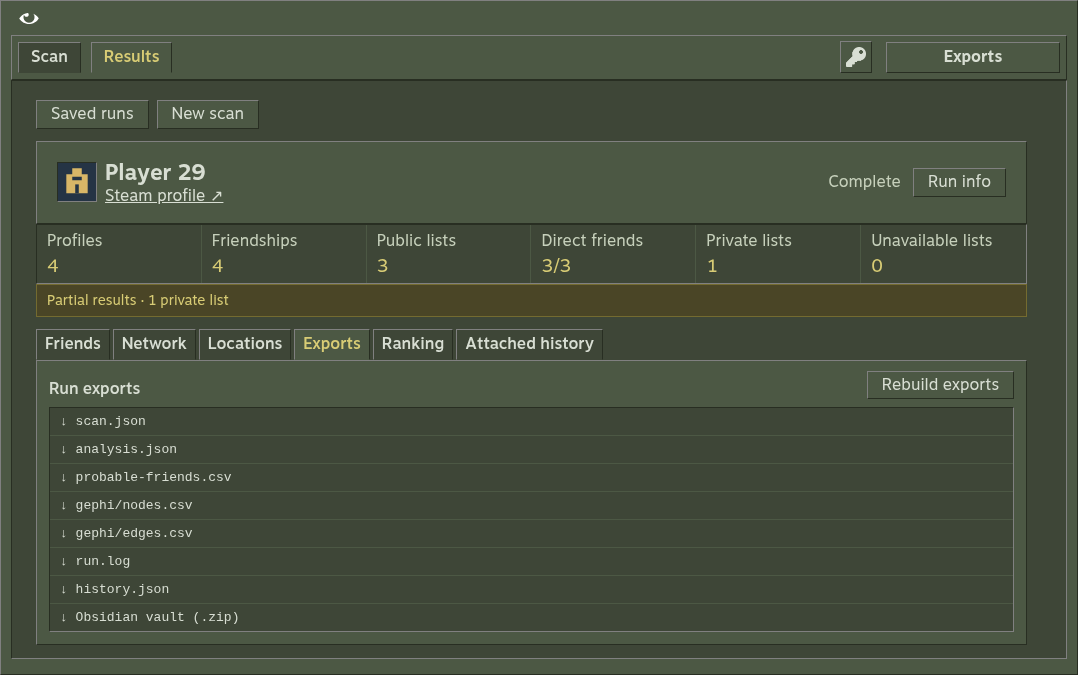
outputs//
scan.json
analysis.json
probable-friends.csv
run.log
gephi/
nodes.csv
edges.csv
history.json # when attached
```
`scan.json` holds settings, profile observations and the resume frontier. `analysis.json` holds metrics, rankings and coverage. `run.log` holds timestamped progress and diagnostic details.
| CSV | Columns |
| ---------------------- | ---------------------------------------------------------------------------------------------------------------------------------------------------------------------------------------------------------------------- |
| `gephi/nodes.csv` | `Id`, `Label`, `degree`, `betweenness`, `modularity_class`, `is_seed`, `is_hub`, `is_banned`, `vac_bans`, `is_public` |
| `gephi/edges.csv` | `Source`, `Target`, `Kind` with `friend` or `group` |
| `probable-friends.csv` | `candidate_steamid`, `name`, `score`, `evidence_score`, `undirected_mutual_count`, `incoming_mutual_count`, `authored_count_index`, `admitted`, `jaccard_with_seed`, `shared_groups`, `shared_games`, `friends_status` |
CSV fields are quoted when needed, and formula-like text is escaped for spreadsheet imports. Steam IDs stay strings in JSON; set spreadsheet ID columns to text.
## Interpretation and availability [#interpretation-and-availability]
`Id`, `Source`, `Target` and candidate identifiers are SteamID64 strings. `modularity_class` maps to graph community; `is_hub` uses the configured betweenness percentile. `vac_bans` is an observed VAC count; unavailable ban observations are not confirmed clean records.
`admitted` distinguishes ranking candidates inside the graph cap. `incoming_mutual_count` differs from undirected mutuals; `score` and `evidence_score` currently contain the same bounded combined index. See [scoring](/docs/reference/scoring).
Optional `history.json` contains merged, reimportable history with original captures. [History format](/docs/reference/history-format) explains identity and date preservation.
## Obsidian vault [#obsidian-vault]
Download **Obsidian vault (.zip)** from **Exports**. Extract it and open the folder as a vault, or copy the notes into an existing vault. No plugin is required.
* `Vapora.md` records the target, run status, coverage and limits.
* `Profiles/.md` stores profile properties and observed friendship links. Names appear as aliases, so renaming a person does not break the links.
* `History.md`, when available, keeps dated friendship and comment observations. Shared-group links stay separate from friendships.
Unknown observations stay unknown. Exporting reads the saved run, leaves its checkpoint unchanged and makes no Steam requests.
## Rebuild [#rebuild]
**Exports → Rebuild exports** regenerates reports/CSV for a completed run offline, retaining checkpoint bytes and attached history. `npm start -- analyze RUN_ID` rebuilds from saved observations. No API key is needed. Incomplete runs and concurrent operations reject export rebuilding.
The browser download surface only exposes known run artifacts. Desktop **Open output folder** opens the selected run or outputs root.
# History formats and dates (/docs/reference/history-format)
## Accepted inputs [#accepted-inputs]
Vapora accepts normalized account history JSON, profile NDJSON and the provider's flattened Svelte data/chunk stream. A capture must identify one account. Mixed accounts, mismatched attachments and malformed recognized sections fail explicitly. Browser imports are limited to 2 MB.
```json
{
"steamID64": "76561198000000000",
"name": "Example",
"lastChecked": 1750000000,
"historic": {
"friends": [
{ "Friend": "76561198000000001", "FriendDate": 1700000000, "UnfriendDate": 0, "Name": "Friend" }
],
"persona": [], "url": [], "pfp": [], "comments": []
}
}
```
## Dates [#dates]
Supplied profile observation dates (`lastChecked`, `lastUpdated`) must be integer Unix seconds from 0 through 4102444800. Missing or null dates remain unknown. Record dates that are missing, null or malformed display as Undated and stay outside date-range filters. Capture/retrieval time is distinct from provider observation time.
A zero or missing `UnfriendDate` means open as of the source date. Open ends stop at the source date for duration calculation. Overlaps count once; contradictory intervals remain inspectable and have no unqualified duration.
## Membership [#membership]
The newest authoritative observation determines current presence/absence. A complete live list establishes either; a partial list establishes presence only. Same-date contradictions stay unknown. Former requires friendship evidence and authoritative absence; Other means no captured friendship evidence. A newer closure supersedes a provisional open interval.
## Comment identity [#comment-identity]
Provider, target and supplied comment ID identify a comment. Numeric IDs must be safe integers; fractional or rounded IDs fail. Exact string IDs preserve precision. Numeric/string representations of one ID refer to the same event. Versions are retained; display chooses the newest observation date, then capture time.
Anonymous author/date/message tuples use the largest multiplicity in a single capture across captures, labeled estimated. Identified and anonymous events remain separate. Comment ranking describes captured scope, not all comments ever made.
## Preservation and coverage [#preservation-and-coverage]
Every distinct original UTF-8 input, capture, provider field and comment version remains exportable. Byte-identical reimports are idempotent; distinct captures are not automatically pruned. Original-input downloads preserve their bytes.
Automatic fetching records profile and page responses and their URLs. Malformed or repeated pages, empty pages before declared totals, inconsistent totals, request failures and bounded limits produce partial coverage. Profile-summary totals remain separate from accessible endpoint totals. Provider-restricted records are not inferred from a discrepancy.
See [History workflow](/docs/guides/history) and the [product contract](https://github.com/Microck/vapora/blob/main/docs/product-contract.md#history-restoration-and-analysis).
# Scoring and populations (/docs/reference/scoring)
Scores measure captured support. They are not probabilities of friendship or proof of residence.
## Count index [#count-index]
For count `x`, reference population `P` and baseline `B`:
```text
A(x) = 100 * (
2 * min(1, x / max(1, 1.5 * meanTopN(P)))
+ 2 * min(1, x / max(1, max(P)))
+ min(1, x / B)
) / 5
```
| Parameter | Default or meaning |
| ------------- | -------------------------------- |
| Top N | 5 |
| Baseline B | 50 |
| `meanTopN(P)` | Mean of the largest Top N counts |
| Empty P | No index |
### Network reference population [#network-reference-population]
`P` contains every known direct friend, including zero observed incoming counts and friends outside the admitted graph.
* **Incoming mutuals:** appearances in other direct friends' observed lists.
* **Undirected mutuals:** a separate count; do not substitute it for incoming mutuals.
* **Unknown lists:** add no observed edges. They are not measured empty lists.
## Combined index [#combined-index]
```text
combined = (
wm * A(incomingMutual)
+ 100 * wf * Jfriends
+ 100 * wg * Jgroups
+ 100 * wa * Jgames
) / sum(weights)
```
| Signal | Default weight |
| --------------------------- | -------------- |
| Incoming-mutual count index | 1 |
| Friend Jaccard | 0 |
| Group Jaccard | 0 |
| Game Jaccard | 0 |
Optional comparisons use bounded Jaccard; raw overlap counts remain available.
| Condition | Behavior |
| --------------------- | ------------------------------------------------------------------- |
| Complete, empty union | Jaccard is zero |
| Unknown comparison | No observed support; denominator unchanged and availability visible |
| All weights zero | No combined index; sort by observed incoming count |
| Equal scores | Break ties by Steam ID |
Sorting retains full precision. Rounding happens only for display.
## Friend-comment index [#friend-comment-index]
The same count formula uses a different reference population:
* Include positive-count authors with friendship evidence anywhere in the captures, including former friends.
* Exclude nonfriend commenters and displayed zero rows from the reference.
* Friendship filters do not change the reference; date ranges do.
* Profile and ban metadata filters use source observation dates.
There is no second all-commenter index. Comment ranking describes captured scope, not every comment ever made.
## Location support [#location-support]
Network and friend-comment location evidence are calculated separately. Only supplied country/city codes participate; missing-city records stay visible outside the calculation.
For city support `s`, total support `T` and location baseline `B_location`:
```text
L = 100 * (2 * s / T + min(1, s / B_location)) / 3
```
| Setting or condition | Behavior |
| --------------------- | ----------------------------------------------------- |
| Aggregation | Sum or product; default product |
| Location baseline | Default 100 |
| Product includes zero | Support is zero |
| Total support is zero | No index or share |
| Arithmetic | Exact integer sums/products; bounded ratio conversion |
| Export | Decimal strings preserve integer precision |
Results retain contributor and zero-contributor counts, raw support, source population and coverage. Self-reported location fields and these indices do not establish residence.
## Network metrics and score scaling [#network-metrics-and-score-scaling]
| Metric | Calculation |
| ---------------- | ----------------------------------------------------------- |
| Friendship graph | Undirected, admitted profiles and observed friendships only |
| Community | Louvain |
| Betweenness | Normalized, unweighted |
| Hub | Positive betweenness at or above the configured percentile |
| Group links | Excluded from friendship metrics |
`score` and `evidence_score` contain the same bounded combined index. The leading candidate is not rescaled to 100. Missing observations can reduce observed support without establishing absence.
## Worked count example [#worked-count-example]
With population `[10, 5, 0]`, Top N **5** and baseline **50**:
1. `meanTopN(P) = 5` and `max(P) = 10`.
2. For count **5**, the three terms are `2 × 5/7.5`, `2 × 5/10` and `5/50`.
3. `A(5) ≈ 48.67`.
The zero row participates in the network reference. Friend-comment ranking uses the separate population described above.
## Source [#source]
* [`src/scoring.ts`](https://github.com/Microck/vapora/blob/main/src/scoring.ts)
* [`src/analysis.ts`](https://github.com/Microck/vapora/blob/main/src/analysis.ts)
* [Formula contract](https://github.com/Microck/vapora/blob/main/docs/product-contract.md#formula-contract)
# Settings reference (/docs/reference/settings)
The canonical validation and defaults live in [`src/model.ts`](https://github.com/Microck/vapora/blob/main/src/model.ts).
| Setting / CLI flag | Default | Accepted values |
| ------------------------------------------- | ------- | ------------------------------- |
| Depth / `--depth` | 2 | Integer 1–5 |
| Nodes / `--max-nodes` | 500 | Integer 0–1000; 0 removes cap |
| Requests/min / `--rpm` | 120 | Integer 0–120; 0 removes pacing |
| Skip private / `--skip-private` | Off | Boolean enable flag |
| Groups / `--groups` | Off | Boolean enable flag |
| Games / `--games` | Off | Boolean enable flag |
| Hub percentile / `--hub-percentile` | 0.99 | Number 0.5–1 |
| Mutual weight / `--mutual-weight` | 1 | Number 0–100 |
| Friend Jaccard / `--jaccard-weight` | 0 | Number 0–100 |
| Group weight / `--group-weight` | 0 | Number 0–100 |
| Game weight / `--game-weight` | 0 | Number 0–100 |
| Top N / `--top-n` | 5 | Integer 1–1000 |
| Count baseline / `--count-baseline` | 50 | Integer 1–1000000 |
| Location aggregation / `--location-support` | product | `sum` or `product` |
| Location baseline / `--location-baseline` | 100 | Integer 1–1000000 |
## Presets and profiles [#presets-and-profiles]
`inner` uses depth 1 and cap 300. `community` uses all defaults. CLI settings start from defaults, apply the chosen preset, replace settings with the saved profile when supplied, then apply explicit flags. Boolean flags enable a feature; there are no corresponding `--no-*` flags.
GUI **Apply** saves defaults. Named profiles contain settings only. GUI file filters are unrelated to CLI presets.
Resume uses saved run settings. CLI `analyze` rebuilds from the checkpoint; ranking flags do not edit that saved checkpoint. Use the UI's **Save ranking** to change a completed run.
## Environment [#environment]
| Variable | Purpose |
| ---------------------------- | ------------------------------------------------ |
| `STEAM_API_KEY` | Steam API credential for CLI and startup |
| `VAPORA_ROOT` | Desktop data root |
| `VAPORA_BROWSER` | Chrome/Chromium executable for browser E2E tests |
| `VAPORA_BROWSER_SCREENSHOTS` | Optional browser test screenshot destination |
| `VAPORA_DESKTOP` | Packaged executable for desktop E2E |
| `VAPORA_DESKTOP_ASAR` | Packaged `app.asar` for desktop E2E |
`npm start` optionally loads `.env`. See [credentials](/docs/getting-started/api-key) and [CLI](/docs/reference/cli).